8
Indicating the remaining battery capacity
(Fig. 9)
Only for battery cartridges with “B” at the end of the model
number
Press the check button on the battery cartridge to indicate
the remaining battery capacity. The indicator lamps light
up for few seconds.
Note:
• Depending on the conditions of use and the ambient
temperature, the indication may differ slightly from the
actual capacity.
Installing the soft bended rod antenna
(Fig. 10 & 11)
Install the soft bended rod antenna as shown in the figure.
Note:
There is a click in the battery compartment designed to
store the removed antenna.
Using supplied AC power adaptor
(Fig. 12)
Remove the rubber protector and insert the adaptor plug
into the DC socket on the front side of the radio. Plug the
adaptor into a standard mains socket outlet. Whenever
the adaptor is used, the battery pack is automatically
disconnected. The AC adaptor should be disconnected
from the main supply when not in use.
This radio has three tuning methods- Scan tuning, Manual
tuning and Memory presets recall.
Selecting a station - DAB
1. Press the Power button to switch on your radio.
2. Select the DAB mode by pressing the Band button.
3. Press the Advanced setting button and rotate the
Volume/Tuning Control/Select knob until “Station List”
is flashing on the screen. Press the Volume/Tuning
Control/Select knob to enter the list of the stations.
4. Rotate the Volume/Tuning Control/Select knob to
scroll through the list of available stations. Press the
knob to select the station.
5. Adjust the desired volume by rotating the Volume/
Tuning Control/Select knob.
Display modes - DAB
Your radio has a range of display options in the DAB
mode:
Press the Info button to cycle through the various options
shown in the following letters (a. to g.).
a. Station name Indicates the station name being
listened to.
b. Program type Indicates the type of station being
listened to. E.g. Pop, Classics, News,
etc.
c. Multiplex name Indicates the name of the DAB
multiplex to which the current station
belongs.
d. Time & date Indicates the current time and date.
e. Frequency and channel
Indicates the frequency and channel
number for the currently tuned DAB
station.
f. Bit rate/Audio type
Indicates the digital audio bit rate and
audio type for the currently tuned
DAB station.
g. Signal strength Indicates the signal strength for the
currently tuned DAB station.
Finding new stations – DAB
From time to time, new DAB radio stations may become
available. Or you may have moved to a different part of
the country. In this case you may need to activate your
radio to scan for new stations.
To allow the radio to find the available stations, it is
recommended to carry out a full scan of the entire DAB
Band III frequencies.
1. Press the Auto tune button.
2. Your radio will perform a full scan of the DAB
frequencies. As new stations are found, the station
counter on the left side in the display will increase and
stations will be added to the list.
Manual tuning – DAB
Manual tuning allows you to tune your radio to a particular
DAB frequency in Band III. This function can also be used
to assist the positioning of the antenna or the radio so as
to optimize reception for a specific channel or frequency.
1. Press the Advanced setting button and rotate the
Volume/Tuning Control/Select knob until “Manual
Tune” shown on the display. Press the Volume/Tuning
Control/Select knob to enter the manual tuning mode.
2. Rotate the Volume/Tuning Control/Select knob to
select the desired DAB channel. Press Volume/Tuning
Control/Select knob to confirm the chosen frequency.
Station order setup – DAB
Your radio has 3 station order settings from which you can
choose. The station order settings are alphanumeric,
ensemble and valid station.
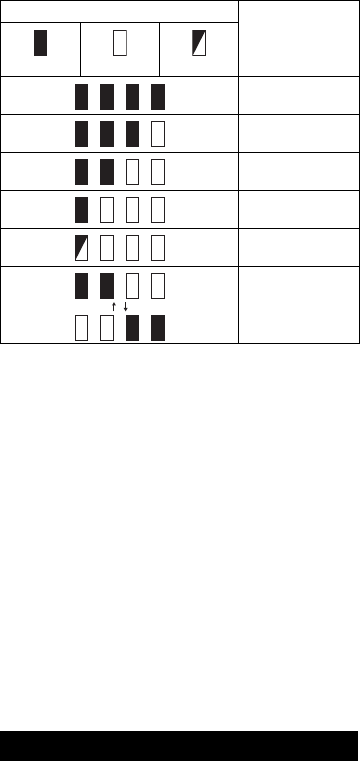
Indicator lamps
Remaining
capacity
Lighted Off Blinking
75% to 100%
50% to 75%
25% to 50%
0% to 25%
Charge the
battery.
The battery may
have
malfunctioned.
OPERATION


انضم للمحادثة المتعلقة بهذا المنتج
هنا يمكنك مشاركة رأيك حول راديو DMR110 Makita. إذا كان لديك سؤال، فاقرأ الدليل بعناية أولاً. يمكن طلب الدليل باستخدام نموذج الاتصال الخاص بنا.
الإجابة | كان ذلك مفيدا (10) (ترجم من قبل جوجل)
الإجابة | كان ذلك مفيدا (9) اقرأ أكثر (ترجم من قبل جوجل)
كان ذلك مفيدا (0) (ترجم من قبل جوجل)
الإجابة | كان ذلك مفيدا (8) اقرأ أكثر (ترجم من قبل جوجل)
كان ذلك مفيدا (45) (ترجم من قبل جوجل)
الإجابة | كان ذلك مفيدا (5) اقرأ أكثر (ترجم من قبل جوجل)
كان ذلك مفيدا (0) (ترجم من قبل جوجل)
الإجابة | كان ذلك مفيدا (0) (ترجم من قبل جوجل)
الإجابة | كان ذلك مفيدا (0) (ترجم من قبل جوجل)