كتيب Bowers and Wilkins Formation Duo مكبر الصوت

هل تحتاج إلى دليل لـ Bowers and Wilkins Formation Duo مكبر الصوت الخاص بك؟ يمكنك أدناه عرض وتنزيل دليل PDF باللغة العربية مجانًا. يحتوي هذا المنتج حاليًا على 5 من الأسئلة الشائعة، و0 من التعليقات، كما حصل على 1 من الأصوات بمتوسط ​​تقييم منتج يبلغ rating%/100. إذا لم يكن هذا هو الدليل الذي تريده، يرجى الاتصال بنا.

هل منتجك معيب ولا يقدم الدليل أي حل؟ انتقل إلى Repair Café للحصول على خدمات الإصلاح المجانية.

كتيب

Loading…
4
ENGLISH
Switch On and Off
With all connections made, and the Bowers &
Wilkins Home app installed on your mobile device,
your Formation Duo are ready to be set up.
Formation Duo have no mains power switch and,
following a short start-up routine, will be operational
as soon as they are connected to mains power. They
will play an audio prompt when their startup routine
is complete.
When Formation Duo, that have not been previously
used, are rst switched on they will automatically
enter setup mode to enable their connection to your
home network and to any other available Formation
devices. Setup mode is indicated by a slow amber
pulse illumination of the speaker’s Form buttons
. Formation Duo will also appear in the Bowers
& Wilkins Home app as available for setup, either
on the initial app page, or after selecting ‘Add
Formation product’ from the app Settings page.
Your Formation Duo manage their operational state
and power consumption entirely automatically and
will switch to a power saving mode after twenty
minutes of inactivity. There is no need ever to switch
off your Formation Duo, however should you wish to
do so, simply disconnected them from mains power.
Your Formation Duo will retain their settings without
mains power.
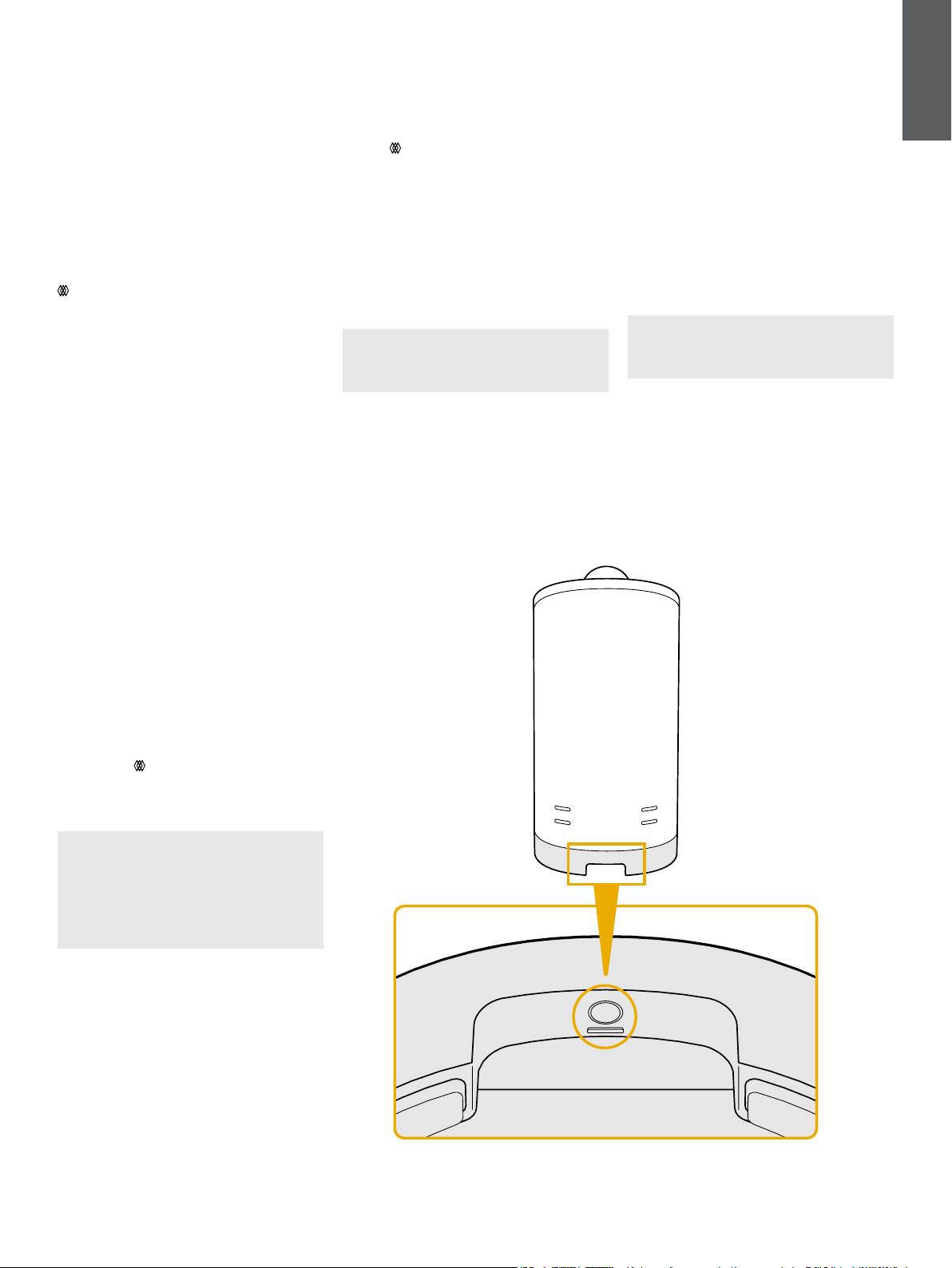
You can restart each Formation Duo by a short
press and release of the reset buttons located on
their rear panels Pressing the button will switch the
Formation Duo off and on again. All settings will be
retained when your Formation Duo restart. You can
also restart your Formation Duo via the Bowers &
Wilkins Home app Settings page. The reset button is
illustrated in Diagram 3.
If you wish to reset your Formation Duo to their
default settings, press and hold each reset button
for ve seconds. On restart, your Formation Duo will
enter setup mode. All settings will be deleted when
your Formation Duo reset. You can also reset your
Formation Duo via the Bowers & Wilkins Home app
Settings menu.
Network Setup
With your Formation Duo in setup mode, with their
Form button
illumination pulsing slowly amber,
launch the Bowers & Wilkins Home app on your
iOS or Android device. The app will guide you with
prompts though the setup process.
Note: Formation Duo employ a Bluetooth
connection to the device running the Bowers
& Wilkins Home app during the setup process.
Bluetooth signals have a relatively short range
and can be interrupted by room boundaries, so
we recommend that your Formation Duo and
Bowers & Wilkins Home app device remain in
close proximity during the setup process.
The Bowers & Wilkins Home app will rst search
for Formation products in setup mode and display
a screen inviting the selection of one. Tap to select
your Formation Duo. If you have already set up a
Formation product and are adding an additional
one, select ‘Add Formation product’ from the app
Settings menu.
Diagram 3
Reset button
The Bowers & Wilkins Home app will next invite
you to name the “space” in which your Formation
Duo are to be used. A list of default space names
is provided but you can also create your own.
When you have selected, or created, a space
name, the app will ask you to touch the Form
button
on the front of one Formation Duo to
conrm the selection.
If a wireless network connection for your
Formation Duo is to be used, the next setup stage
will connect your Formation Duo to your home
WiFi network. The app will ask you to conrm
the correct WiFi network and ask you to input its
password. Alternatively, if your Formation Duo
are connected to your network router using an
Ethernet cable, this stage of the setup process will
be bypassed.
Note: If you already have other Formation
products connected to your WiFi network,
Formation Duo setup will not require you to
input the WiFi password.
With WiFi network conguration, and space
selection complete, your Formation Duo are ready
for use. Your Formation Duo will play an audio
prompt to conrm successful setup.
Bluetooth Setup
You can connect your Formation Duo to a Bluetooth
enabled audio source device, such as a smartphone,
to play audio over Bluetooth. Your Formation Duo
must rst be “paired” with the Bluetooth audio
source device.
Once you have completed the Formation Duo
network setup, open the Bowers & Wilkins Home
app Settings page, and select the Formation Space
that you wish to pair a Bluetooth device with. Next
select ‘+ Pair a new device’ from the Bluetooth
menu and follow the app instructions to complete
pairing. Your Formation Duo will play an audio
prompt when pairing is complete and their Space will
become available to the paired Bluetooth device for
audio playback.
Note: Up to eight Bluetooth devices can be
simultaneously paired with each Formation
space, however devices will not connect and
play to paired spaces automatically.
قم بتنزيل الكتيب الدليلي بالعربية (PDF, 9.03 MB)
(عليك الاهتمام بالبيئة وقم بطبع هذا الكتيب الدليلي فقط إذا كان ذلك ضروريا بالفعل)

Loading…

التقييم

‫قم بإخبارنا عن رأيك في Bowers and Wilkins Formation Duo مكبر الصوت عن طريق ترك تقييم للمنتج. هل تريد أن تشارك بتجاربك مع هذا المنتج أو طرح سؤال ما؟ يرجى ترك تعليق في أسفل الصفحة.
هل أنت راض عن Bowers and Wilkins Formation Duo مكبر الصوت؟
نعم لا
100%
0%
1 التصويت

انضم للمحادثة المتعلقة بهذا المنتج

هنا يمكنك مشاركة رأيك حول Bowers and Wilkins Formation Duo مكبر الصوت. إذا كان لديك سؤال، فاقرأ الدليل بعناية أولاً. يمكن طلب الدليل باستخدام نموذج الاتصال الخاص بنا.

المزيد عن دليل المستخدم هذا

نحن ندرك أنه من الجيد أن يكون لديك دليل ورقي لـ Bowers and Wilkins Formation Duo مكبر الصوت الخاص بك. يمكنك دائمًا تنزيل الدليل من موقعنا الإلكتروني وطباعته بنفسك. إذا كنت ترغب في الحصول على الدليل الأصلي، فنوصيك بالاتصال بـ Bowers and Wilkins. قد يكون بمقدورهم تقديم دليل أصلي. هل تبحث عن دليل Bowers and Wilkins Formation Duo مكبر الصوت الخاص بك بلغة مختلفة؟ اختر لغتك المفضلة على صفحتنا الرئيسية وابحث عن رقم الطراز لمعرفة ما إذا كان متوفرًا لدينا.

تحديد

الاسم التجاري Bowers and Wilkins
نموذج Formation Duo
فئة مكبرات الصوت
نوع الملف PDF
حجم الملف 9.03 MB

كافة الأدلة لـ Bowers and Wilkins مكبرات الصوت
المزيد من أدلة مكبرات الصوت

الأسئلة المتداولة حول Bowers and Wilkins Formation Duo مكبر الصوت

يبحث فريق الدعم لدينا عن معلومات مفيدة عن المنتج وإجابات على الأسئلة المتكررة. وإذا وجت عدم دقة في أسئلتنا المتكررة، فيرجى إخبارنا بذلك عن طريق استخدام استمارة الاتصال بنا.

أرغب في توصيل مكبر صوت بجهاز التليفزيون باستخدام HDMI ، فما المنفذ الذي يجب أن أستخدمه؟ تم التحقق

تحتاج إلى استخدام منفذ HDMI-ARC ، المصمم خصيصًا لتوصيل أجهزة الصوت.

كان ذلك مفيدا (1488) اقرأ أكثر

ماذا تقول الترددات عن السماعة الخاصة بي؟ تم التحقق

يشير إلى نطاق الترددات التي يمكن أن ينتجها مكبر الصوت. سيوفر النطاق الأكبر من الترددات تباينًا أكبر في الصوت ينتج صوتًا عالي الجودة.

كان ذلك مفيدا (795) اقرأ أكثر

متى تكون موسيقاي صاخبة جدا؟ تم التحقق

يمكن أن تبدأ الأصوات التي تزيد عن 80 ديسيبل في إلحاق الضرر بالسمع. الأصوات التي تزيد عن 120 ديسيبل تضر بالسمع على الفور. تعتمد شدة الضرر على عدد المرات ومدة وجود الصوت.

كان ذلك مفيدا (477) اقرأ أكثر

هل يعمل البلوتوث من خلال الجدران والسقوف؟ تم التحقق

تعمل إشارة البلوتوث من خلال الجدران والسقف ، ما لم تكن مصنوعة من المعدن. اعتمادًا على السُمك والمادة الخاصة بالجدار ، يمكن أن تفقد الإشارة قوتها.

كان ذلك مفيدا (238) اقرأ أكثر

إلى أي مستوى ضوضاء آمن للأطفال؟ تم التحقق

يتضرر سمع الأطفال أسرع من البالغين. لذلك من المهم عدم تعريض الأطفال أبدًا لضوضاء أعلى من 85 ديسيبل. في حالة سماعات الرأس يوجد موديلات خاصة للأطفال. في حالة وجود مكبرات صوت أو مواقف أخرى ، يجب أن تكون متيقظًا لأن الضوضاء لا تتجاوز هذا المستوى.

كان ذلك مفيدا (212) اقرأ أكثر


كتيب Bowers and Wilkins Formation Duo مكبر الصوت

منتجات ذات صله

فئات ذات صلة

×
Download